
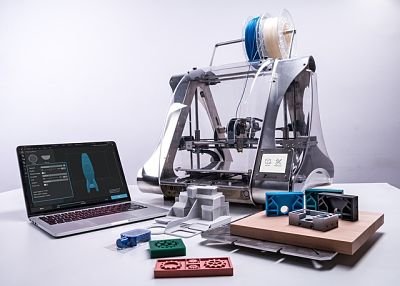
This guide covers everything you need to know about 3D printing: what it is, how a 3D printer works, the main technologies, types of printers, materials, software, where to find models, real-world applications, pros and cons and where the technology is heading. If you’re starting from zero, this is the place to begin.
- What is 3D printing?
- How does a 3D printer work?
- Main parts of a 3D printer
- A brief history of 3D printing
- 3D printing technologies
- Types of 3D printers
- 3D printing materials
- 3D printing software
- Where to download STL files
- Calibrating a 3D printer
- Real-world applications of 3D printing
- Pros and cons of 3D printing
- The future of 3D printing
- Bottom line
- 3D printing FAQ
- Keep reading
Quick answer: 3D printing builds physical objects layer by layer from a digital model. For most beginners, the best entry point is an FDM (filament) printer printing PLA, with models downloaded from sites such as Printables or MakerWorld and prepared in a free slicer. Choose resin only if you need very fine detail, such as miniatures or jewelry.
What is 3D printing?
3D printing, also called additive manufacturing, creates objects by adding material layer by layer, instead of cutting it away (as milling does) or pouring it into a mold. That makes it possible to produce complex shapes, one-off custom parts and prototypes quickly and with little waste.
How does a 3D printer work?
1. Design or download a 3D model
Everything starts with a digital model, usually an STL or 3MF file. You can design it in CAD software or download it from a model-sharing site.
2. Prepare it in a slicer
A slicer program cuts the model into hundreds or thousands of horizontal layers and generates the instructions (G-code) the printer follows: paths, speeds, temperatures, infill and supports.
3. Print layer by layer
FDM printers melt plastic filament and deposit it through a nozzle. SLA and MSLA printers cure liquid resin with light. SLS printers fuse powder with a laser. In every case, the object grows one thin layer at a time.
4. Post-processing
FDM parts usually just need supports removed and occasionally sanding or painting. Resin parts must be washed in isopropyl alcohol and cured under UV light.
Main parts of a 3D printer
- Extruder: pushes the filament toward the hotend.
- Hotend: melts the filament and deposits it through the nozzle.
- Build plate: the surface where the part is printed, often heated.
- Stepper motors: move the axes precisely.
- Mainboard: the electronics that control the whole machine.
- Power supply: feeds the motors, heaters and electronics.
- Sensors: for bed leveling, filament runout, vibration compensation and more.
A brief history of 3D printing
- 1980s, the first steps: stereolithography (SLA) is invented and patented, followed by SLS and FDM.
- 1990s, industrial expansion: companies adopt 3D printing for rapid prototyping.
- 2005–2015, democratization: open-source projects like RepRap and expiring patents bring affordable desktop printers.
- 2020–2026, the new generation: fast CoreXY printers, automatic calibration, multicolor systems and printers that work almost out of the box.
3D printing technologies
| Technology | How it works | Strengths | Weaknesses |
|---|---|---|---|
| FDM | Melts and deposits plastic filament | Affordable, versatile, large parts, many materials | Visible layer lines, less fine detail |
| SLA | A laser cures liquid resin | Very high detail and smooth surfaces | Resin handling, post-processing |
| MSLA | An LCD screen cures a whole layer of resin at once | Fast, high detail, affordable | Same resin handling as SLA |
| DLP | A projector cures each resin layer | Fast and precise | Less common for home users |
| SLS | A laser fuses polymer powder | Strong parts, no supports needed | Expensive, industrial |
| MJF | Fusing agents and heat fuse powder | Fast production of functional parts | Industrial equipment only |
Which technology is best? For home users, FDM is the most versatile and affordable; MSLA resin wins for detail. SLS and MJF are for professional production, usually through printing services.
Types of 3D printers
- Filament (FDM) printers: the most popular for home users, education and functional parts.
- Resin printers: for miniatures, jewelry, dental models and anything that needs very fine detail.
- Professional and industrial printers: large formats, technical materials and production reliability.
Which 3D printer should you choose?
| If you… | Choose |
|---|---|
| Are a beginner | An FDM printer with automatic calibration |
| Need extreme detail | An MSLA resin printer |
| Make functional parts | An enclosed FDM printer that handles PETG, ABS and ASA |
| Work professionally | A professional printer suited to your materials and volume |
3D printing materials
| Material | Key traits | Best for |
|---|---|---|
| PLA | Easy to print, low odor, rigid but brittle and heat-sensitive | Beginners, models and decor |
| PETG | Tougher and more heat-resistant than PLA | Functional and outdoor parts |
| ABS | Heat-resistant and strong, needs an enclosure | Technical parts |
| ASA | Like ABS with UV resistance | Outdoor parts |
| TPU | Flexible and rubbery | Phone cases, gaskets, grips |
| Advanced materials | Nylon, polycarbonate, carbon-fiber blends | Engineering parts |
3D printing software
- 3D design software: Tinkercad for beginners, Fusion or Onshape for mechanical design and Blender for organic and artistic models.
- Slicers: Bambu Studio, OrcaSlicer, PrusaSlicer and UltiMaker Cura for FDM; Chitubox or Lychee for resin.
- Remote management: OctoPrint, Klipper interfaces such as Mainsail and Fluidd, or your brand’s own app.
Where to download STL files
Popular sites include Printables, Thingiverse, MakerWorld, Cults3D, MyMiniFactory and Thangs. Check each model’s license before selling prints.
Calibrating a 3D printer
Good calibration is the difference between failed prints and great ones. The key steps are bed leveling, Z offset, temperature, flow, retraction and pressure advance. Many modern printers automate most of these, but knowing them helps you fix problems.
Real-world applications of 3D printing
- Medicine: surgical guides, anatomical models, prosthetics and dental aligners.
- Engineering and prototyping: fast iteration of designs before mass production.
- Automotive: prototypes, jigs, fixtures and spare parts.
- Aerospace: lightweight, complex parts for aircraft and rockets.
- Architecture: scale models and even 3D-printed buildings.
- Education: hands-on STEM learning.
- Home users: replacement parts, organizers, gifts, cosplay and hobbies.
Pros and cons of 3D printing
- Total customization
- On-demand manufacturing
- Lower prototyping costs
- Decentralized production
- Wide variety of materials
- Increasingly accessible
- Limited speed for mass production
- Learning curve
- Variable surface finish
- Professional equipment is expensive
- Material limitations
The future of 3D printing
- Multicolor and multi-material printing becoming standard on consumer machines.
- Advanced automation: self-calibration, failure detection and print farms.
- New materials with better strength, heat resistance and sustainability.
- Distributed production: parts printed close to where they’re needed.
- AI integration: for print monitoring, settings optimization and model generation.
- Construction: 3D-printed homes and structures.
Bottom line
3D printing has gone from an industrial technology to a tool anyone can use at home. Understanding how it works, which technology and materials fit your projects and which software to use will help you get great results from your first print. Start with an FDM printer and PLA, learn the basics, and grow from there.
3D printing FAQ
An additive manufacturing technology that creates physical objects layer by layer from digital models.
FDM printers are usually the best option for beginners thanks to their ease of use and lower cost.
Filament printers are more versatile and affordable, while resin printers offer a much higher level of detail.
PLA is still the most recommended material for beginners.
Prices range from around $200 for entry-level models to well over $10,000 for industrial equipment.
Usually a design program (or a model download site) and a slicer to prepare the print files.
No. Modern printers have greatly simplified the process with automatic calibration and ready-made profiles.
Yes. Many people sell personalized products, prototypes, decor or on-demand printing services.