
Las Mejores Impresoras 3D de Filamento
Las impresoras 3D de filamento, también conocidas como impresoras FDM (Fused Deposition Modeling), siguen siendo la tecnología más utilizada dentro del mundo de la impresión 3D.
Su popularidad no es casualidad.
Son más económicas que las impresoras de resina, permiten trabajar con una enorme variedad de materiales y ofrecen una excelente relación entre coste, facilidad de uso y calidad de impresión.
Actualmente existen modelos capaces de fabricar desde simples piezas decorativas hasta componentes funcionales para ingeniería, robótica, automoción o pequeñas producciones industriales.
Sin embargo, elegir la mejor impresora 3D de filamento puede resultar complicado.
El mercado ha evolucionado enormemente durante los últimos años y cada vez aparecen más fabricantes, tecnologías y sistemas de impresión que prometen mejores resultados.
Por ello hemos elaborado esta guía actualizada con las mejores impresoras 3D de filamento de 2026, analizando los modelos más recomendables para:
- Usuarios principiantes.
- Makers.
- Diseñadores.
- Ingenieros.
- Pequeñas empresas.
- Talleres de fabricación.
- Creadores de prototipos.
Además, explicaremos qué características debes analizar antes de comprar una impresora FDM, qué materiales son compatibles y cuáles son las opciones más interesantes según tu presupuesto.
- Las Mejores Impresoras 3D de Filamento
- Comparativa rápida de las mejores impresoras 3D de filamento de 2026
- Nuestra recomendación
- ¿Cómo hemos elegido estas impresoras 3D de filamento?
- ¿Qué es una impresora 3D de filamento o FDM?
- Ventajas de las impresoras 3D de filamento
- ¿Qué debes tener en cuenta antes de comprar una impresora 3D de filamento?
- Las 8 Mejores Impresoras 3D de Filamento de 2026
- 1. Bambu Lab P1S – La mejor impresora 3D de filamento calidad-precio de 2026
- 2. Bambu Lab A1 – La mejor impresora 3D de filamento para la mayoría de usuarios
- 3. Creality K1C – La mejor impresora 3D de filamento para materiales técnicos
- 4. Prusa MK4S – La impresora 3D de filamento más fiable del mercado
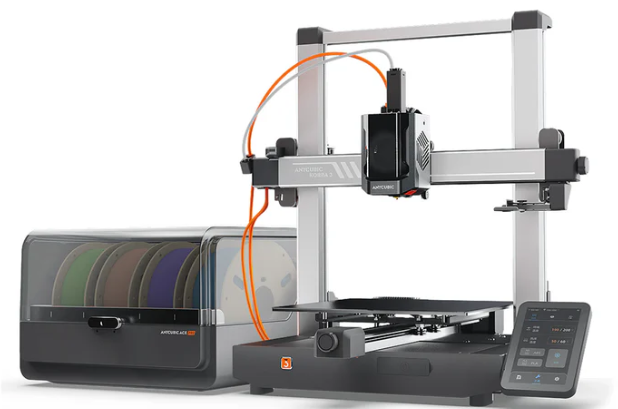
- 5. Anycubic Kobra 3 Combo – La mejor impresora 3D de filamento multicolor calidad-precio
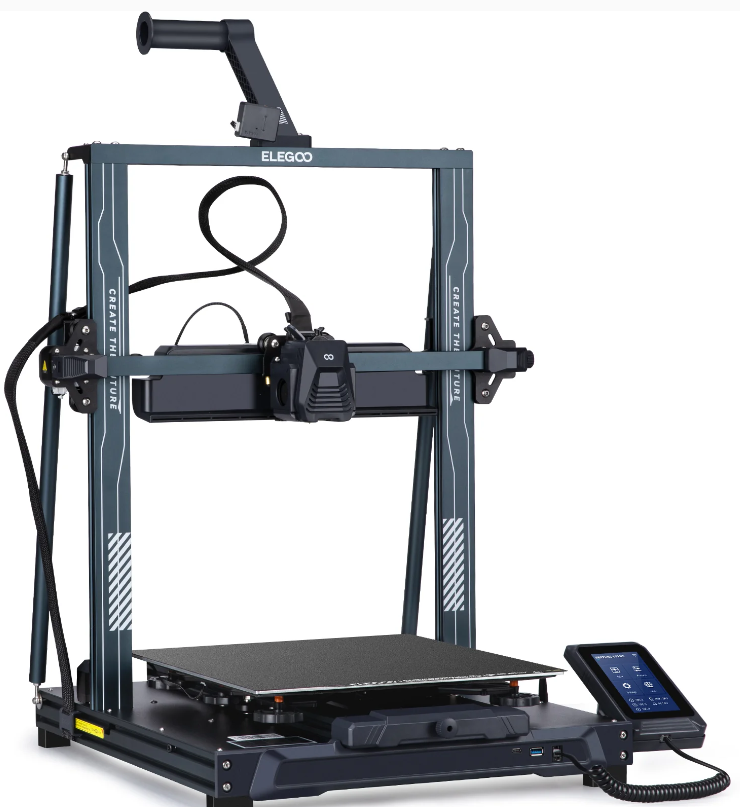
- 6. Elegoo Neptune 4 Plus – La mejor impresora 3D de filamento para grandes proyectos
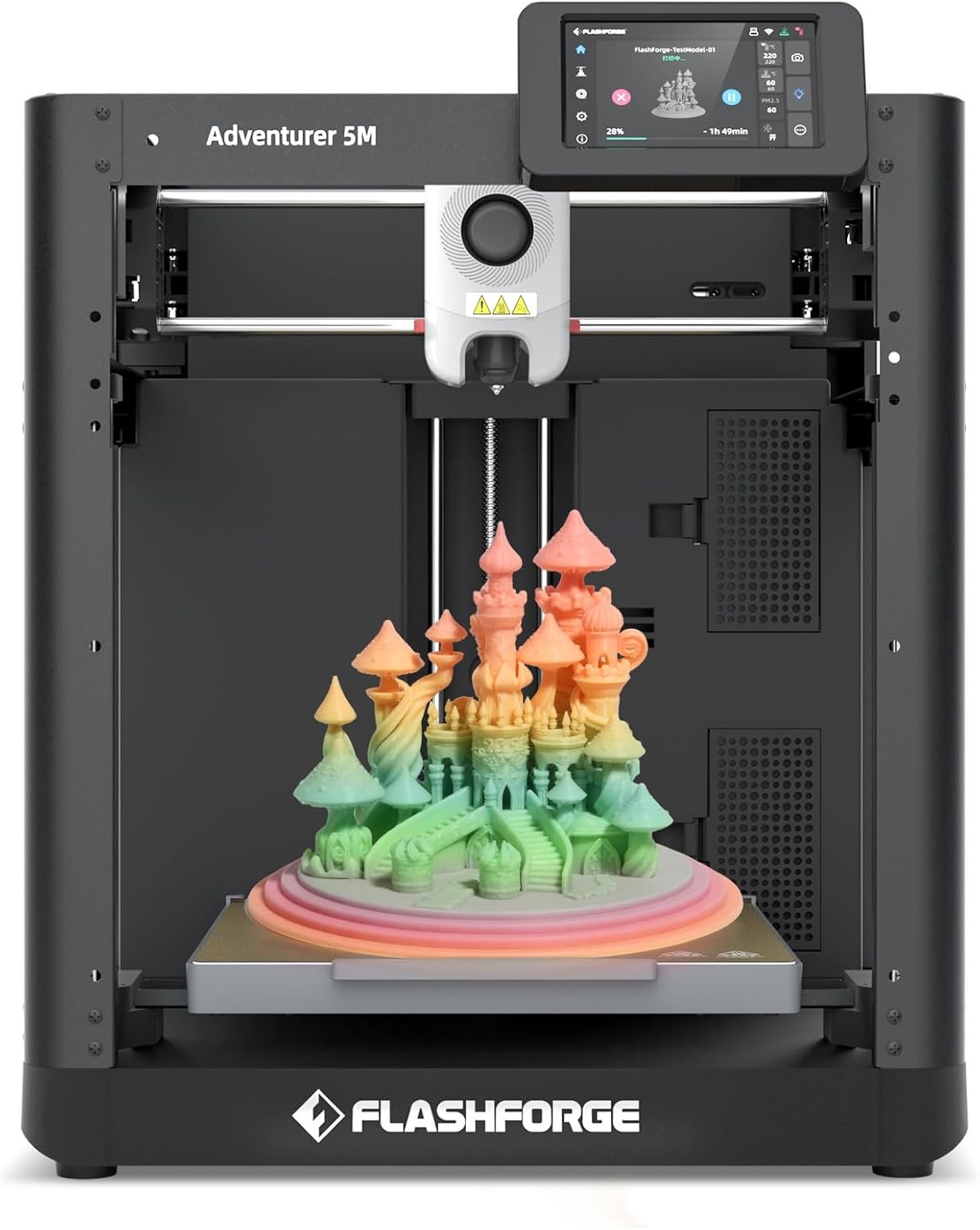
- 7. Flashforge Adventurer 5M – La mejor impresora 3D de filamento Plug & Play
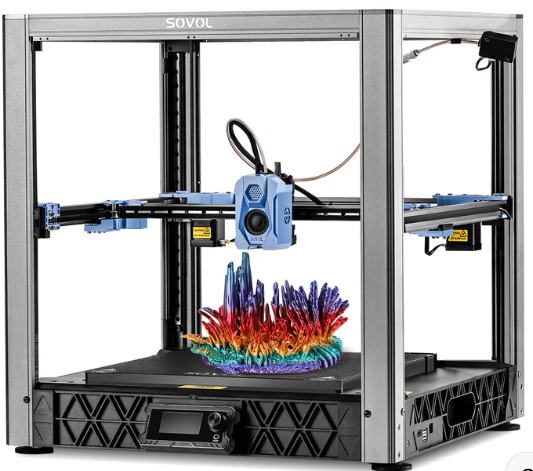
- 8. Sovol SV08 – La mejor impresora 3D de filamento de gran formato
- ¿Qué impresora 3D de filamento comprar según cada necesidad?
- Ventajas y desventajas de las impresoras 3D de filamento
- Ventajas de las impresoras 3D de filamento
- Desventajas de las impresoras 3D de filamento
- Sigue aprendiendo sobre impresión 3D
- Preguntas frecuentes sobre impresoras 3D de filamento
Comparativa rápida de las mejores impresoras 3D de filamento de 2026
| Modelo | Mejor para | Tecnología | Volumen de impresión | Punto fuerte | Punto débil |
|---|---|---|---|---|---|
| Bambu Lab P1S | Calidad-precio avanzada | FDM | 256 × 256 × 256 mm | Velocidad y ecosistema | Precio superior |
| Bambu Lab A1 | Usuarios domésticos | FDM | 256 × 256 × 256 mm | Facilidad de uso | Sin cámara cerrada |
| Creality K1C | Velocidad y materiales técnicos | FDM | 220 × 220 × 250 mm | Muy rápida | Curva de aprendizaje |
| Prusa MK4S | Fiabilidad profesional | FDM | 250 × 210 × 220 mm | Calidad y soporte | Coste elevado |
| Anycubic Kobra 3 Combo | Impresión multicolor | FDM | 250 × 250 × 260 mm | Sistema multicolor | Más compleja |
| Elegoo Neptune 4 Plus | Gran volumen calidad-precio | FDM | 320 × 320 × 385 mm | Tamaño y velocidad | Espacio necesario |
| Flashforge Adventurer 5M | Plug & Play | FDM | 220 × 220 × 220 mm | Facilidad de uso | Ecosistema más cerrado |
| Sovol SV08 | Grandes proyectos | FDM | 350 × 350 × 345 mm | Volumen masivo | Dimensiones |
Nuestra recomendación
Si buscas una única recomendación capaz de satisfacer a la mayoría de usuarios, actualmente la Bambu Lab P1S es probablemente la mejor impresora 3D de filamento del mercado por relación entre prestaciones, calidad, velocidad y facilidad de uso.
Ofrece características que hace apenas unos años estaban reservadas a equipos mucho más caros:
- Cámara cerrada.
- Impresión de alta velocidad.
- Compatibilidad con materiales técnicos.
- Excelente ecosistema de software.
- Posibilidad de impresión multicolor.
- Automatización avanzada.
Por otro lado, si eres completamente nuevo en el mundo de la impresión 3D, la Bambu Lab A1 sigue siendo una de las mejores opciones para empezar gracias a su facilidad de uso y extraordinaria relación calidad-precio.
¿Cómo hemos elegido estas impresoras 3D de filamento?
A diferencia de muchas comparativas que simplemente recopilan modelos populares, hemos seleccionado estas impresoras utilizando criterios objetivos que realmente afectan a la experiencia de uso.
Fiabilidad
Una impresora debe funcionar de forma consistente durante cientos de horas de impresión.
Hemos descartado modelos con problemas recurrentes o componentes poco fiables.
Calidad de impresión
Hemos priorizado impresoras capaces de ofrecer excelentes resultados tanto en piezas decorativas como en componentes funcionales.
Compatibilidad con materiales
No todas las impresoras son capaces de trabajar con los mismos materiales.
Valoramos especialmente la compatibilidad con:
- PLA
- PETG
- TPU
- ABS
- ASA
- Materiales técnicos
Ecosistema de software
Actualmente el software es tan importante como la propia impresora.
Fabricantes como Bambu Lab, Prusa, Creality o Anycubic han realizado enormes avances en este apartado.
Facilidad de mantenimiento
Una buena impresora debe permitir:
- Sustitución sencilla de componentes.
- Acceso a repuestos.
- Actualizaciones.
- Mantenimiento rápido.
Relación calidad-precio
No buscamos únicamente las mejores impresoras.
Buscamos aquellas que realmente ofrecen el mejor equilibrio entre coste y rendimiento.
¿Qué es una impresora 3D de filamento o FDM?
Las impresoras 3D FDM son máquinas que crean objetos tridimensionales depositando material fundido capa a capa.
Para ello utilizan bobinas de filamento termoplástico, que son calentadas mediante un sistema denominado hotend.
El material se funde y se deposita siguiendo las instrucciones generadas por un programa de laminado o slicer.
Capa tras capa, la impresora construye el objeto completo.
Esta tecnología es actualmente la más utilizada por varias razones:
- Coste reducido.
- Materiales económicos.
- Fácil mantenimiento.
- Amplia variedad de aplicaciones.
- Gran comunidad de usuarios.
Por ello la mayoría de usuarios comienzan su experiencia con una impresora 3D de filamento antes de dar el salto a tecnologías más especializadas.
Ventajas de las impresoras 3D de filamento
Las impresoras FDM siguen dominando el mercado por una razón muy sencilla:
ofrecen una combinación difícil de igualar entre precio, facilidad de uso y versatilidad.
Entre sus principales ventajas encontramos:
Coste reducido
Los filamentos suelen ser mucho más económicos que las resinas.
Gran variedad de materiales
Actualmente es posible imprimir utilizando:
- PLA
- PETG
- ABS
- ASA
- TPU
- Nylon
- Fibra de carbono
- Composites técnicos
Menor mantenimiento
Requieren menos limpieza y menos procesos posteriores que las impresoras de resina.
Piezas funcionales
Son ideales para fabricar:
- Herramientas.
- Soportes.
- Carcasas.
- Prototipos.
- Componentes mecánicos.
Comunidad enorme
La mayoría de tutoriales, perfiles y recursos de impresión 3D están orientados a tecnología FDM.
¿Qué debes tener en cuenta antes de comprar una impresora 3D de filamento?
Elegir correctamente una impresora puede ahorrarte cientos de euros y muchas horas de frustración.
Las características más importantes son las siguientes.
Volumen de impresión
Determina el tamaño máximo de las piezas que podrás fabricar.
Para la mayoría de usuarios domésticos:
- 220 × 220 × 250 mm suele ser suficiente.
Para cosplay o prototipos grandes:
- 300 mm o más resulta recomendable.
Velocidad de impresión
Las nuevas generaciones de impresoras permiten imprimir varias veces más rápido que los modelos tradicionales.
Esto puede marcar una enorme diferencia en proyectos largos.
Tipo de extrusor
Los sistemas Direct Drive suelen ofrecer mejores resultados con materiales flexibles como TPU.
Cámara cerrada
Muy recomendable para imprimir:
- ABS
- ASA
- Materiales técnicos
Además mejora la estabilidad térmica de la impresión.
Autonivelación automática
Actualmente es una característica prácticamente imprescindible.
Reduce enormemente la curva de aprendizaje y mejora la tasa de éxito de las impresiones.
Las 8 Mejores Impresoras 3D de Filamento de 2026
A continuación analizamos en profundidad las impresoras FDM más recomendables del mercado actual.
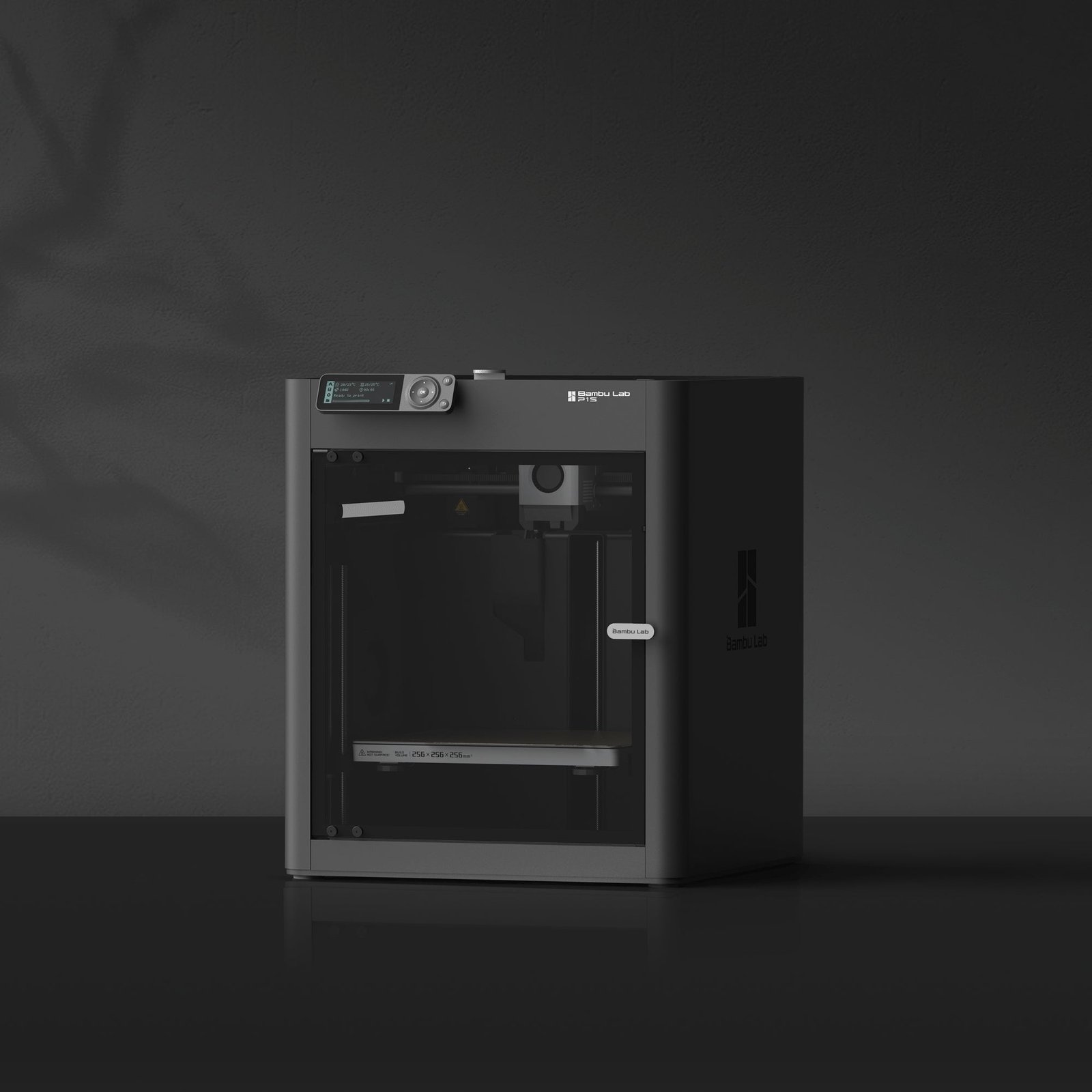
1. Bambu Lab P1S – La mejor impresora 3D de filamento calidad-precio de 2026
Si actualmente tuviera que recomendar una única impresora 3D de filamento capaz de satisfacer a la mayoría de usuarios, desde aficionados avanzados hasta pequeños negocios de impresión 3D, la respuesta sería clara: Bambu Lab P1S.
Durante los últimos años, Bambu Lab ha revolucionado completamente el sector de la impresión 3D FDM.
Mientras muchos fabricantes seguían evolucionando lentamente, la marca irrumpió en el mercado ofreciendo características que anteriormente sólo encontrábamos en equipos mucho más caros.
La P1S es probablemente el mejor ejemplo de esta filosofía.
Estamos ante una máquina diseñada para ofrecer una experiencia premium sin alcanzar los precios de una impresora industrial.
Su principal atractivo es que combina prácticamente todo lo que un usuario moderno puede necesitar:
- Alta velocidad.
- Excelente calidad de impresión.
- Cámara cerrada.
- Compatibilidad con materiales técnicos.
- Ecosistema avanzado.
- Automatización.
- Posibilidad de impresión multicolor.
Y lo mejor de todo es que consigue hacerlo manteniendo una relación calidad-precio extraordinaria.
Uno de los aspectos que más sorprenden cuando se utiliza una Bambu Lab P1S por primera vez es la velocidad.
Durante años, imprimir una pieza compleja podía requerir muchas horas.
Las nuevas arquitecturas CoreXY implementadas por Bambu Lab permiten reducir drásticamente esos tiempos sin sacrificar calidad.
Esto supone una enorme ventaja para:
- Makers.
- Diseñadores industriales.
- Ingenieros.
- Empresas de prototipado.
- Negocios de impresión bajo demanda.
Otro punto clave es la calidad de impresión.
La P1S produce superficies limpias, capas uniformes y detalles muy precisos incluso utilizando configuraciones relativamente básicas.
Esto significa que los usuarios principiantes pueden obtener resultados excelentes sin necesidad de convertirse en expertos en calibración.
Pero donde realmente empieza a diferenciarse de gran parte de la competencia es en la compatibilidad con materiales.
Mientras muchas impresoras económicas están orientadas casi exclusivamente al PLA, la P1S puede trabajar cómodamente con:
- PLA
- PETG
- ABS
- ASA
- TPU
- Materiales reforzados
- Filamentos técnicos
La incorporación de una cámara cerrada ayuda enormemente a mantener temperaturas estables y minimizar deformaciones durante la impresión.
Para usuarios que desean fabricar piezas funcionales o componentes de ingeniería, esta característica puede ser determinante.
Otro aspecto muy valorado es el ecosistema de software desarrollado por Bambu Lab.
Su software Bambu Studio se ha convertido rápidamente en uno de los slicers más apreciados por la comunidad.
Además, la integración con la aplicación móvil y la gestión remota permiten controlar las impresiones desde prácticamente cualquier lugar.
La posibilidad de añadir el sistema AMS (Automatic Material System) convierte a la P1S en una de las impresoras multicolor más interesantes del mercado.
Esto permite imprimir objetos utilizando múltiples colores o materiales sin necesidad de intervención manual constante.
Por todo ello, la Bambu Lab P1S se ha ganado un lugar privilegiado dentro de cualquier ranking de las mejores impresoras 3D de filamento, siendo actualmente una de las opciones más recomendables para usuarios que buscan una máquina duradera, moderna y preparada para varios años de uso intensivo.
¿Para quién recomendamos la Bambu Lab P1S?
Esta impresora es especialmente interesante para:
- Usuarios que ya tienen cierta experiencia.
- Makers avanzados.
- Pequeñas empresas.
- Ingeniería y diseño de producto.
- Producción de piezas funcionales.
- Usuarios que buscan impresión multicolor.
- Personas que quieren una impresora preparada para crecer con ellas.
Si tu presupuesto lo permite, probablemente sea una de las compras más inteligentes que puedes realizar actualmente dentro del sector FDM.
Características técnicas de Bambu Lab P1S
- Volumen de impresión: 256 × 256 × 256 mm
- Tecnología: FDM CoreXY
- Velocidad máxima de impresión: hasta 500 mm/s
- Nº de extrusores: 1
- Compatible con AMS multicolor
- Materiales compatibles:
- PLA
- PETG
- TPU
- ABS
- ASA
- Materiales técnicos
- Cámara cerrada: Sí
- Pantalla: LCD integrada
- Conectividad:
- WiFi
- App móvil
- Nube
- Detección de fin de filamento: Sí
- Recuperación tras apagado: Sí
- Monitorización remota: Sí
- Peso aproximado: 12,95 kg
Ventajas e inconvenientes de Bambu Lab P1S
- Probablemente la mejor relación calidad-precio del mercado FDM
- Impresión extremadamente rápida
- Cámara cerrada para materiales técnicos
- Compatible con impresión multicolor mediante AMS
- Excelente ecosistema de software
- Muy buena calidad de impresión
- Ideal para usuarios avanzados y pequeñas empresas
- Compatible con PLA, PETG, ABS, ASA y TPU
- Precio superior a impresoras básicas
- Requiere cierto aprendizaje para aprovechar todo su potencial
- El sistema AMS incrementa el coste final
- No es la opción más económica para principiantes absolutos
Video resña y comparativa de Bambu Lab P1S
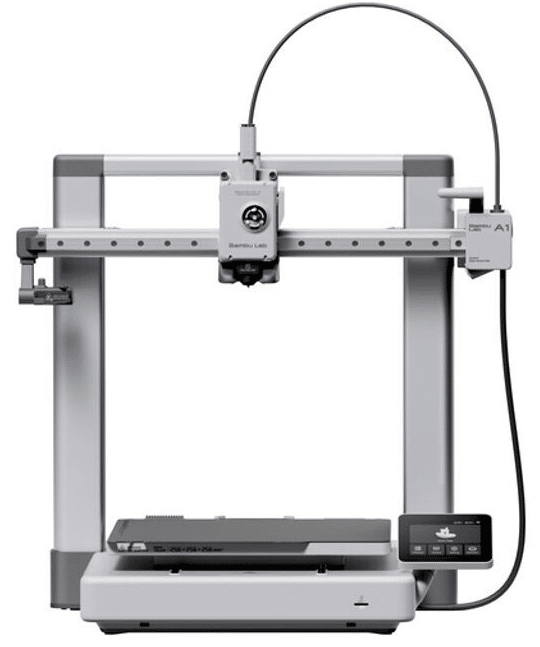
2. Bambu Lab A1 – La mejor impresora 3D de filamento para la mayoría de usuarios
Si la Bambu Lab P1S representa el equilibrio perfecto entre prestaciones profesionales y precio, la Bambu Lab A1 se ha convertido en la impresora que más recomendamos actualmente a usuarios domésticos.
De hecho, para muchas personas es directamente la mejor impresora 3D de filamento calidad-precio disponible en 2026.
¿Por qué?
Porque consigue ofrecer una experiencia extremadamente sencilla sin renunciar a características avanzadas.
La A1 ha sido diseñada para eliminar gran parte de las barreras tradicionales de entrada a la impresión 3D.
Desde el primer momento transmite una sensación muy diferente a la de las impresoras clásicas.
Todo está pensado para funcionar de forma intuitiva.
Esto incluye:
- Autonivelación automática.
- Calibración inteligente.
- Gestión automática de flujo.
- Detección de errores.
- Integración con aplicaciones móviles.
Gracias a ello se ha convertido en una de las impresoras favoritas para:
- Usuarios domésticos.
- Estudiantes.
- Profesores.
- Makers.
- Diseñadores.
- Personas que buscan una impresora fiable y sencilla.
Otro de sus grandes atractivos es la calidad de impresión.
Los resultados son excelentes incluso utilizando configuraciones básicas.
Esto permite obtener piezas con gran nivel de detalle desde el primer día.
Además, la velocidad de impresión está muy por encima de la mayoría de impresoras tradicionales de entrada.
Mientras muchas máquinas económicas siguen utilizando arquitecturas antiguas, la A1 aprovecha tecnologías modernas que permiten imprimir mucho más rápido manteniendo una calidad sobresaliente.
También destaca especialmente por su compatibilidad con el sistema AMS Lite, que permite realizar impresiones multicolor de forma relativamente sencilla.
Esta característica resulta muy interesante para:
- Decoración.
- Figuras.
- Modelismo.
- Educación.
- Creación de contenido.
La realidad es que pocas impresoras han conseguido ofrecer una combinación tan equilibrada entre facilidad de uso, calidad, velocidad y precio.
Por ello, la Bambu Lab A1 se ha convertido en una de las impresoras FDM más populares del mercado actual.
Características técnicas de Bambu Lab A1
- Volumen de impresión: 256 × 256 × 256 mm
- Tecnología: FDM
- Velocidad máxima: hasta 500 mm/s
- Autonivelación automática
- Compatible con AMS Lite
- Materiales compatibles:
- PLA
- PETG
- TPU
- Conectividad WiFi
- Aplicación móvil
- Detección de fin de filamento
- Recuperación tras apagones
- Pantalla táctil
Ventajas e inconvenientes de Bambu Lab A1
- Excelente relación calidad-precio
- Muy fácil de utilizar
- Ideal para principiantes y usuarios intermedios
- Gran calidad de impresión
- Alta velocidad de trabajo
- Compatible con impresión multicolor
- Software muy intuitivo
- No dispone de cámara cerrada
- Menos adecuada para ABS o ASA que la P1S
- El AMS Lite supone un coste adicional
- Menos orientada a producción intensiva
Video resña y comparativa de Bambu Lab A1
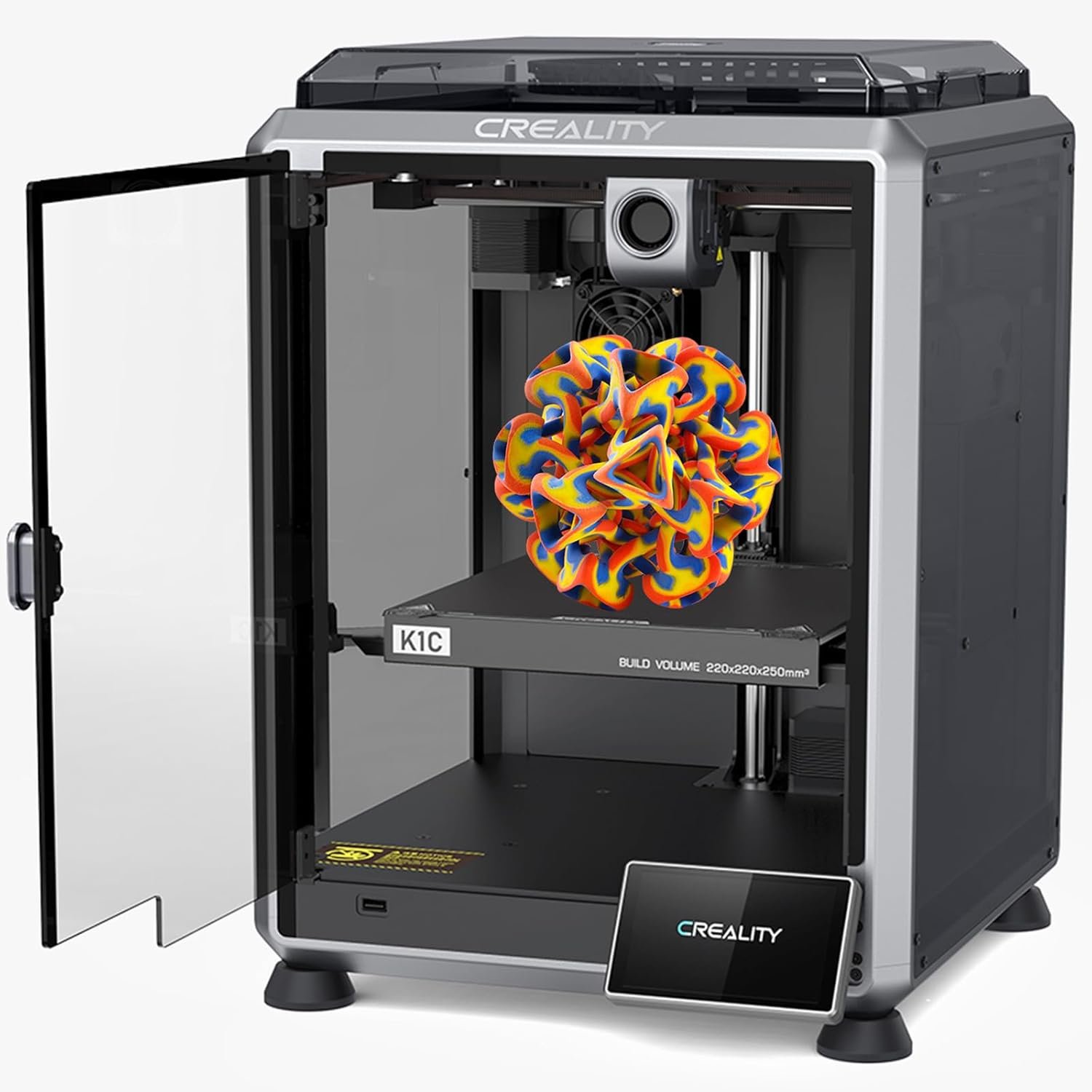
3. Creality K1C – La mejor impresora 3D de filamento para materiales técnicos
Si hay una marca que ha marcado la evolución de la impresión 3D doméstica durante la última década, esa es Creality.
Y dentro de su nueva generación de impresoras CoreXY, la Creality K1C se ha convertido en uno de los modelos más interesantes para usuarios que buscan velocidad, rendimiento y compatibilidad con materiales avanzados.
Mientras que la serie Ender sigue dominando el segmento de entrada, la K1C apunta directamente a un perfil de usuario mucho más exigente.
Estamos ante una impresora diseñada para competir de tú a tú con fabricantes como Bambu Lab, ofreciendo una combinación muy atractiva de:
- Alta velocidad.
- Cámara cerrada.
- Compatibilidad con materiales técnicos.
- Extrusión avanzada.
- Excelente calidad de impresión.
Uno de los aspectos más destacados de la K1C es precisamente su capacidad para trabajar con materiales más complejos que el clásico PLA.
Esto la convierte en una opción muy interesante para:
- Ingeniería.
- Diseño industrial.
- Prototipado funcional.
- Robótica.
- Piezas mecánicas.
Muchos usuarios comienzan imprimiendo únicamente con PLA.
Sin embargo, conforme avanzan suelen necesitar materiales más resistentes.
Aquí es donde la K1C ofrece una ventaja importante.
Gracias a su diseño cerrado y su sistema de extrusión optimizado puede trabajar de forma mucho más eficiente con:
- ABS
- ASA
- PETG
- TPU
- Filamentos reforzados con fibra de carbono
Además, incorpora una boquilla endurecida especialmente diseñada para soportar materiales abrasivos.
Otro punto fuerte es la velocidad.
La arquitectura CoreXY permite alcanzar velocidades muy superiores a las impresoras tradicionales tipo Ender.
Esto reduce drásticamente los tiempos de impresión y mejora la productividad.
Para pequeños negocios de impresión 3D o usuarios que imprimen con frecuencia, esta diferencia puede traducirse en muchas horas ahorradas cada semana.
También debemos destacar el ecosistema de Creality.
La marca cuenta con una enorme comunidad internacional, miles de tutoriales, perfiles de impresión optimizados y una gran disponibilidad de repuestos.
Todo ello facilita enormemente el mantenimiento a largo plazo.
En definitiva, si buscas una impresora 3D de filamento profesional, preparada para trabajar con materiales técnicos y con una velocidad sobresaliente, la Creality K1C es una de las opciones más atractivas del mercado actual.
¿Para quién recomendamos la Creality K1C?
- Usuarios avanzados.
- Makers experimentados.
- Ingeniería.
- Robótica.
- Diseño industrial.
- Prototipado funcional.
- Negocios de impresión 3D.
Características técnicas de Creality K1C
- Volumen de impresión: 220 × 220 × 250 mm
- Tecnología: FDM CoreXY
- Velocidad máxima: hasta 600 mm/s
- Nº de extrusores: 1
- Cámara cerrada
- Boquilla endurecida
- Compatible con fibra de carbono
- Materiales compatibles:
- PLA
- PETG
- ABS
- ASA
- TPU
- Filamentos reforzados
- Conectividad WiFi
- Aplicación móvil
- Cámara integrada
- Detección de fin de filamento
- Recuperación tras cortes eléctricos
Ventajas e inconvenientes de Creality K1C
- Excelente velocidad de impresión
- Cámara cerrada para materiales técnicos
- Compatible con fibra de carbono
- Boquilla endurecida incluida
- Muy buena calidad de impresión
- Gran comunidad de usuarios
- Ideal para ingeniería y prototipado
- Más compleja que una impresora para principiantes
- Precio superior a la gama Ender
- Curva de aprendizaje algo mayor
- Volumen de impresión inferior a otros modelos grandes
Video reseña y comparativa de Creality K1C
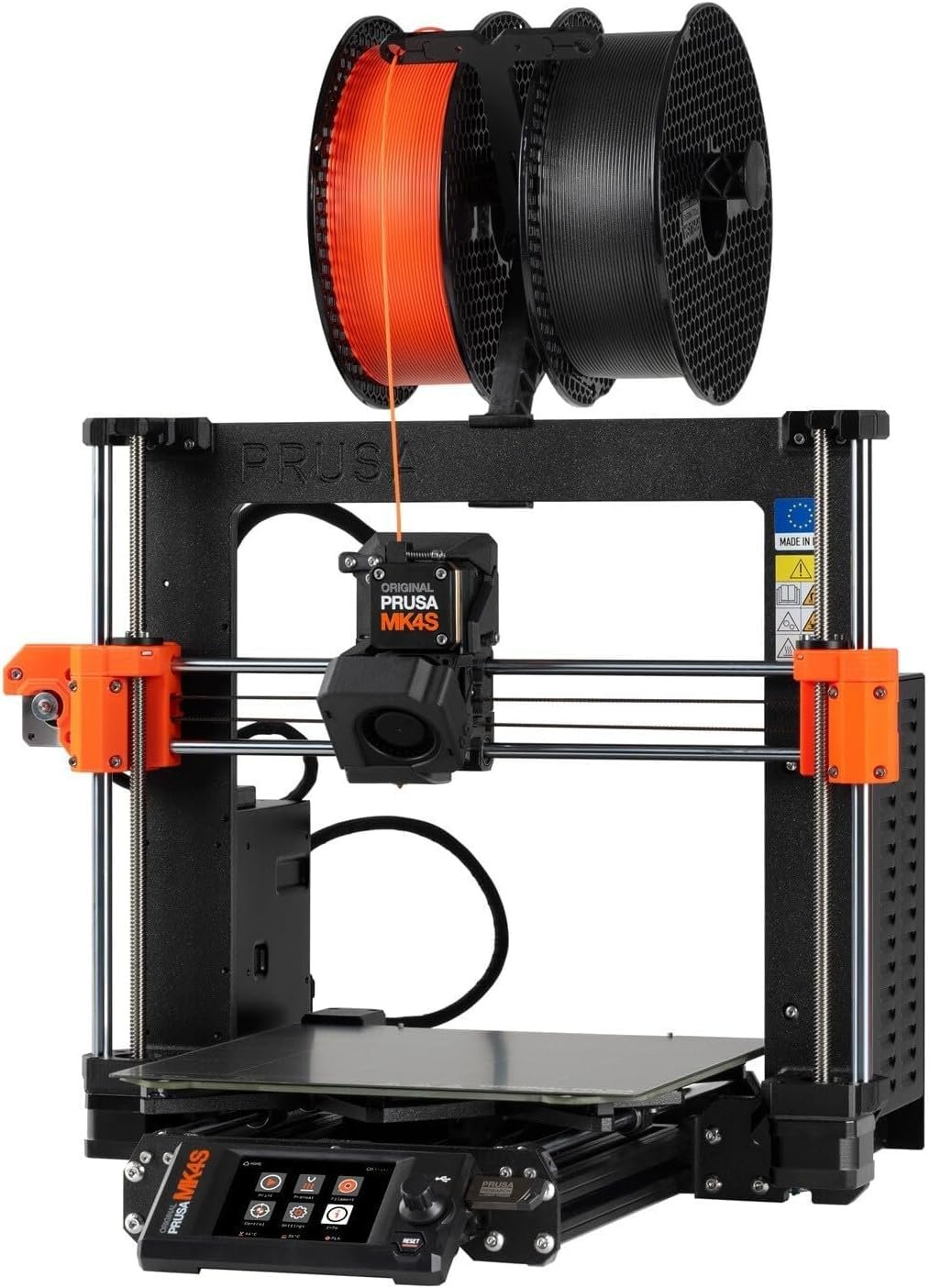
4. Prusa MK4S – La impresora 3D de filamento más fiable del mercado
Hablar de Prusa Research es hablar de una de las compañías más respetadas dentro del mundo de la impresión 3D.
Durante años, la marca fundada por Josef Prusa ha construido una reputación basada en tres pilares fundamentales:
- Fiabilidad.
- Calidad.
- Soporte.
Y precisamente la nueva Prusa MK4S representa la evolución de esa filosofía.
A diferencia de otras impresoras que buscan impresionar mediante cifras espectaculares de velocidad o campañas de marketing agresivas, Prusa continúa apostando por la estabilidad y la consistencia.
Su objetivo es simple:
Que la impresora funcione correctamente durante miles de horas.
Y eso tiene muchísimo valor.
Especialmente para:
- Empresas.
- Centros educativos.
- Laboratorios.
- Ingeniería.
- Usuarios profesionales.
Uno de los aspectos más apreciados por la comunidad es la enorme calidad de construcción.
La MK4S transmite sensación de producto premium desde el primer momento.
Todos los componentes están cuidadosamente seleccionados para ofrecer la máxima durabilidad posible.
Además, incorpora uno de los ecosistemas de software más sólidos del sector.
El conocido PrusaSlicer sigue siendo una referencia dentro del mercado y permite obtener excelentes resultados con muy poca configuración.
Otro punto diferencial es el soporte técnico.
Mientras que muchos fabricantes ofrecen soporte limitado, Prusa destaca por proporcionar documentación extremadamente detallada y una atención al cliente de gran calidad.
La calidad de impresión también sigue siendo sobresaliente.
Aunque existen impresoras más rápidas, pocas son capaces de ofrecer resultados tan consistentes durante largos periodos de uso.
Por ello, la MK4S continúa siendo una de las opciones favoritas para quienes necesitan una herramienta de trabajo fiable y profesional.
¿Para quién recomendamos la Prusa MK4S?
- Centros educativos.
- Universidades.
- Empresas.
- Ingeniería.
- Diseño de producto.
- Usuarios que priorizan fiabilidad.
- Profesionales que imprimen diariamente.
Características técnicas de Prusa MK4S
- Volumen de impresión: 250 × 210 × 220 mm
- Tecnología: FDM
- Velocidad máxima optimizada
- Nº de extrusores: 1
- Nivelación automática
- Extrusor Nextruder
- Compatible con:
- PLA
- PETG
- TPU
- ABS
- ASA
- Nylon
- Pantalla LCD color
- Ethernet y conectividad online
- Compatible con Prusa Connect
- Sensor de filamento
- Recuperación tras apagones
Ventajas e inconvenientes de Prusa MK4S
- Fiabilidad excepcional
- Soporte técnico de referencia
- Excelente calidad de construcción
- Compatible con numerosos materiales
- PrusaSlicer es uno de los mejores slicers del mercado
- Ideal para uso profesional
- Gran comunidad internacional
- Precio elevado frente a fabricantes asiáticos
- No es la impresora más rápida del mercado
- Diseño más conservador que algunos competidores
- Volumen de impresión correcto pero no sobresaliente
Video reseña y comparativa de Prusa MK4S
5. Anycubic Kobra 3 Combo – La mejor impresora 3D de filamento multicolor calidad-precio
La impresión 3D multicolor ha sido durante años una de las funciones más deseadas por los usuarios.
Sin embargo, tradicionalmente suponía sistemas complejos, configuraciones difíciles o inversiones muy elevadas.
Con la llegada de la Anycubic Kobra 3 Combo, la situación ha cambiado radicalmente.
Anycubic ha conseguido acercar la impresión 3D multicolor a un público mucho más amplio gracias a una solución relativamente sencilla, eficiente y con una excelente relación calidad-precio.
Por este motivo la Kobra 3 Combo se ha convertido rápidamente en una de las impresoras más populares entre:
- Creadores de contenido.
- Makers.
- Diseñadores.
- Usuarios domésticos avanzados.
- Negocios de impresión bajo demanda.
Su principal atractivo es el sistema multicolor ACE Pro, que permite trabajar con varios filamentos sin necesidad de cambiar manualmente las bobinas durante la impresión.
Esto abre un enorme abanico de posibilidades creativas.
Por ejemplo:
- Figuras decorativas.
- Logotipos corporativos.
- Señalización.
- Regalos personalizados.
- Modelismo.
- Productos para venta online.
Además de esta capacidad multicolor, la Kobra 3 incorpora muchas de las tecnologías modernas que actualmente se consideran imprescindibles en una impresora 3D de filamento:
- Autonivelación automática.
- Alta velocidad.
- Gestión inteligente de materiales.
- Monitorización remota.
- Interfaz intuitiva.
Otro punto muy interesante es su velocidad de impresión.
Anycubic ha modernizado enormemente su catálogo durante los últimos años y actualmente puede competir con fabricantes como Creality o Bambu Lab en muchos aspectos.
Esto permite reducir considerablemente los tiempos de producción.
La calidad de impresión también es muy destacable.
Las piezas presentan superficies limpias, buena definición y una consistencia notable incluso en proyectos complejos.
Además, la compatibilidad con materiales es bastante amplia.
La Kobra 3 Combo puede trabajar perfectamente con:
- PLA
- PETG
- TPU
- Materiales técnicos básicos
Por ello se convierte en una excelente opción para usuarios que buscan una impresora moderna, rápida y con capacidades multicolor sin alcanzar presupuestos excesivos.
¿Para quién recomendamos la Anycubic Kobra 3 Combo?
- Usuarios creativos.
- Creadores de contenido.
- Makers avanzados.
- Negocios de impresión 3D.
- Venta de productos personalizados.
- Usuarios que quieren impresión multicolor.
Características técnicas de Anycubic Kobra 3 Combo
- Volumen de impresión: 250 × 250 × 260 mm
- Tecnología: FDM
- Velocidad máxima: hasta 600 mm/s
- Sistema multicolor ACE Pro
- Nº de extrusores: 1
- Materiales compatibles:
- PLA
- PETG
- TPU
- Autonivelación automática
- Conectividad WiFi
- Gestión remota
- Detector de filamento
- Recuperación tras apagado
- Pantalla táctil
Ventajas e inconvenientes de Anycubic Kobra 3 Combo
- Excelente sistema de impresión multicolor
- Muy rápida para su categoría
- Gran relación calidad-precio
- Ideal para proyectos creativos
- Autonivelación automática
- Compatible con varios materiales
- Buena calidad de impresión
- El sistema multicolor genera más residuos de material
- Ocupa más espacio que una impresora convencional
- Mayor complejidad de mantenimiento
- No alcanza el ecosistema de Bambu Lab
Video reseña y comparativa de Anycubic Kobra 3 Combo
6. Elegoo Neptune 4 Plus – La mejor impresora 3D de filamento para grandes proyectos
La Elegoo Neptune 4 Plus se ha convertido en una de las impresoras más recomendadas para usuarios que buscan una combinación equilibrada entre:
- Gran volumen de impresión.
- Alta velocidad.
- Precio competitivo.
Mientras que muchas impresoras rápidas sacrifican tamaño o aumentan considerablemente el precio, Elegoo ha conseguido encontrar un punto intermedio muy interesante.
Por este motivo la Neptune 4 Plus es una de las opciones favoritas para:
- Cosplay.
- Decoración.
- Prototipos grandes.
- Robótica.
- Arquitectura.
- Fabricación de piezas funcionales.
Su principal ventaja es el enorme espacio de construcción.
Esto permite fabricar piezas grandes sin necesidad de dividirlas en múltiples partes.
Para muchos usuarios esta característica supone un ahorro enorme de tiempo y trabajo posterior.
Además, incorpora firmware basado en Klipper, una de las tecnologías más populares actualmente dentro del mundo de la impresión 3D.
Gracias a ello puede alcanzar velocidades muy superiores a las impresoras tradicionales.
La calidad de impresión también resulta excelente para su rango de precio.
Incluso trabajando con velocidades elevadas mantiene una buena definición y acabados consistentes.
Otro aspecto especialmente interesante es la compatibilidad con materiales.
La Neptune 4 Plus puede imprimir:
- PLA
- PETG
- TPU
- ABS
- Materiales avanzados básicos
Esto la convierte en una plataforma muy versátil para usuarios que desean experimentar con distintos proyectos.
Por todo ello, si buscas una impresora 3D de filamento de gran formato sin disparar el presupuesto, la Neptune 4 Plus es una de las mejores alternativas disponibles actualmente.
¿Para quién recomendamos la Elegoo Neptune 4 Plus?
- Cosplayers.
- Makers.
- Arquitectos.
- Diseñadores.
- Usuarios que imprimen piezas grandes.
- Pequeños negocios.
Características técnicas de Elegoo Neptune 4 Plus
- Volumen de impresión: 320 × 320 × 385 mm
- Tecnología: FDM
- Velocidad máxima: hasta 500 mm/s
- Firmware Klipper
- Nº de extrusores: 1
- Extrusor Direct Drive
- Materiales compatibles:
- PLA
- PETG
- TPU
- ABS
- Autonivelación automática
- Pantalla táctil
- Detector de filamento
- Recuperación tras apagado
Ventajas e inconvenientes de Elegoo Neptune 4 Plus
- Gran volumen de impresión
- Excelente relación calidad-precio
- Firmware Klipper de serie
- Muy rápida para su tamaño
- Ideal para cosplay y prototipos grandes
- Compatible con múltiples materiales
- Extrusor Direct Drive eficiente
- Requiere bastante espacio físico
- Más compleja de transportar
- No dispone de cámara cerrada
- Menos automatizada que las Bambu Lab
Video reseña y comparativa de Elegoo Neptune 4 Plus
7. Flashforge Adventurer 5M – La mejor impresora 3D de filamento Plug & Play
Una de las principales barreras de entrada para muchas personas interesadas en la impresión 3D sigue siendo el miedo a la complejidad.
Montaje, calibraciones, ajustes, mantenimiento, software…
Afortunadamente, durante los últimos años han aparecido impresoras diseñadas específicamente para simplificar todo el proceso.
Y dentro de esta categoría, la Flashforge Adventurer 5M es una de las opciones más interesantes del mercado.
Flashforge lleva años desarrollando equipos orientados a la facilidad de uso.
Su filosofía siempre ha sido muy clara:
Reducir al máximo la curva de aprendizaje.
Por ello, la Adventurer 5M resulta especialmente atractiva para:
- Usuarios domésticos.
- Centros educativos.
- Profesores.
- Estudiantes.
- Familias.
- Usuarios principiantes.
Su principal ventaja es que prácticamente elimina muchas de las tareas que tradicionalmente complicaban la impresión 3D.
La configuración inicial es rápida y sencilla.
La nivelación se realiza automáticamente.
La interfaz es intuitiva.
Y la experiencia general se acerca mucho más a la de utilizar un electrodoméstico moderno que a la de una impresora 3D tradicional.
Otro punto muy interesante es la velocidad.
Las generaciones anteriores de Flashforge estaban más centradas en la facilidad de uso que en el rendimiento.
Sin embargo, la Adventurer 5M incorpora una arquitectura mucho más moderna que le permite competir perfectamente con otros fabricantes actuales.
Esto significa que no sólo es fácil de usar.
También es rápida.
La calidad de impresión es excelente para:
- PLA.
- PETG.
- TPU.
Además, incorpora un sistema de cambio rápido de boquillas que facilita enormemente el mantenimiento y la adaptación a distintos tipos de proyectos.
Para usuarios que buscan una impresora 3D para casa, una impresora FDM para principiantes o una máquina que simplemente funcione sin complicaciones, la Adventurer 5M es una apuesta muy segura.
¿Para quién recomendamos la Flashforge Adventurer 5M?
- Usuarios principiantes.
- Entornos educativos.
- Hogares.
- Makers ocasionales.
- Usuarios que priorizan simplicidad.
Características técnicas de Flashforge Adventurer 5M
- Volumen de impresión: 220 × 220 × 220 mm
- Tecnología: FDM CoreXY
- Velocidad máxima: hasta 600 mm/s
- Nº de extrusores: 1
- Cambio rápido de boquillas
- Autonivelación automática
- Conectividad WiFi
- Gestión remota
- Materiales compatibles:
- PLA
- PETG
- TPU
- Detector de filamento
- Recuperación tras apagado
- Pantalla táctil
Ventajas e inconvenientes de Flashforge Adventurer 5M
- Muy fácil de utilizar
- Ideal para principiantes
- Configuración extremadamente sencilla
- Alta velocidad de impresión
- Cambio rápido de boquillas
- Excelente opción para educación
- Muy buena calidad de impresión
- Ecosistema más cerrado que otros fabricantes
- Menor capacidad de personalización
- Comunidad más reducida
- Menos adecuada para materiales técnicos avanzados
Video reseña y comparativa de Flashforge Adventurer 5M
8. Sovol SV08 – La mejor impresora 3D de filamento de gran formato
La Sovol SV08 es probablemente una de las impresoras más interesantes para usuarios que buscan imprimir piezas grandes sin dar el salto a equipos industriales mucho más caros.
Durante los últimos años Sovol ha ganado una enorme popularidad gracias a impresoras con una excelente relación calidad-precio.
La SV08 representa uno de sus modelos más ambiciosos.
Su principal objetivo es ofrecer:
- Gran volumen de impresión.
- Alta velocidad.
- Arquitectura moderna.
- Precio competitivo.
Y lo consigue con bastante éxito.
Uno de los aspectos más llamativos es su enorme volumen de construcción.
Esto la convierte en una herramienta fantástica para:
- Cosplay.
- Arquitectura.
- Prototipos funcionales.
- Decoración.
- Ingeniería.
- Fabricación de piezas de gran tamaño.
Muchas impresoras obligan a dividir los modelos en múltiples partes para posteriormente ensamblarlos.
La SV08 reduce enormemente esta necesidad.
Además, incorpora una arquitectura moderna inspirada en sistemas CoreXY que permite imprimir mucho más rápido que las impresoras tradicionales de gran formato.
Esto es especialmente importante porque las piezas grandes suelen requerir muchas horas de trabajo.
También debemos destacar su compatibilidad con distintos materiales.
La impresora puede trabajar perfectamente con:
- PLA
- PETG
- TPU
- ABS
- ASA
Esto amplía enormemente las posibilidades de uso.
Por todo ello, si buscas una impresora 3D FDM de gran volumen, preparada para proyectos ambiciosos y con una excelente relación calidad-precio, la Sovol SV08 es una de las opciones más interesantes del mercado actual.
¿Para quién recomendamos la Sovol SV08?
- Cosplayers.
- Arquitectos.
- Diseñadores industriales.
- Ingeniería.
- Fabricación de prototipos grandes.
- Usuarios avanzados.
Características técnicas de Sovol SV08
- Volumen de impresión: 350 × 350 × 345 mm
- Tecnología: FDM CoreXY
- Velocidad máxima: hasta 700 mm/s
- Nº de extrusores: 1
- Autonivelación automática
- Compatible con Klipper
- Materiales compatibles:
- PLA
- PETG
- TPU
- ABS
- ASA
- Conectividad avanzada
- Detector de filamento
- Recuperación tras apagado
Ventajas e inconvenientes de Sovol SV08
- Volumen de impresión enorme
- Excelente para cosplay y proyectos grandes
- Arquitectura moderna CoreXY
- Gran velocidad de impresión
- Muy buena relación calidad-precio
- Compatible con materiales técnicos
- Ideal para usuarios avanzados
- Ocupa mucho espacio
- No es la mejor opción para principiantes absolutos
- Montaje más complejo que otras alternativas
- Mayor consumo de material en proyectos grandes
Video reseña y comparativa de e Sovol SV08
¿Qué impresora 3D de filamento comprar según cada necesidad?
Elegir la mejor impresora 3D de filamento dependerá principalmente de tu experiencia, presupuesto y tipo de proyectos.
Mejor impresora 3D de filamento calidad-precio
🥇 Bambu Lab P1S
La impresora más equilibrada del mercado actualmente.
Perfecta para usuarios que buscan velocidad, calidad y compatibilidad con materiales avanzados.
Mejor impresora 3D para principiantes
🥇 Bambu Lab A1
La combinación ideal entre facilidad de uso, calidad de impresión y precio.
Mejor impresora 3D para ingeniería
🥇 Creality K1C
Gracias a su compatibilidad con materiales técnicos y fibra de carbono.
Mejor impresora 3D profesional por fiabilidad
🥇 Prusa MK4S
Una auténtica referencia en calidad, estabilidad y soporte técnico.
Mejor impresora 3D multicolor
🥇 Anycubic Kobra 3 Combo
Ideal para proyectos creativos, decoración y productos personalizados.
Mejor impresora 3D de gran formato
🥇 Sovol SV08
Perfecta para cosplay, arquitectura y proyectos de gran tamaño.
Mejor impresora 3D Plug & Play
🥇 Flashforge Adventurer 5M
La más sencilla para quienes quieren empezar a imprimir sin complicaciones.
Ventajas y desventajas de las impresoras 3D de filamento
Las impresoras 3D de filamento siguen siendo la tecnología más utilizada dentro del sector de la fabricación aditiva.
A pesar del enorme crecimiento de las impresoras 3D de resina, las máquinas FDM continúan dominando el mercado gracias a su equilibrio entre coste, facilidad de uso, mantenimiento y versatilidad.
Sin embargo, antes de comprar una impresora conviene conocer tanto sus ventajas como sus limitaciones.
De esta forma podrás determinar si realmente es la tecnología más adecuada para tus necesidades.
Ventajas de las impresoras 3D de filamento
Son las impresoras 3D más económicas
Una de las principales razones por las que millones de usuarios comienzan con una impresora FDM es el coste.
Actualmente existen modelos muy capaces por menos de 300 €.
Además, los consumibles también suelen ser considerablemente más baratos que en otras tecnologías.
Por ejemplo:
- Bobinas de PLA.
- Bobinas de PETG.
- Bobinas de ABS.
pueden encontrarse a precios muy asequibles.
Esto permite imprimir durante cientos de horas sin realizar grandes inversiones.
Gran variedad de materiales
Otra enorme ventaja de las impresoras 3D de filamento es la diversidad de materiales disponibles.
Actualmente es posible imprimir con:
- PLA
- PETG
- ABS
- ASA
- TPU
- Nylon
- Policarbonato
- Fibra de carbono
- Filamentos compuestos
Cada uno ofrece propiedades específicas para distintos usos.
Por ejemplo:
- El PLA es perfecto para principiantes.
- El PETG aporta resistencia.
- El TPU ofrece flexibilidad.
- El ASA resiste mejor el exterior.
- La fibra de carbono mejora determinadas propiedades mecánicas.
Menor mantenimiento
Comparadas con las impresoras de resina, las impresoras FDM requieren bastante menos mantenimiento.
No es necesario:
- Manipular resinas líquidas.
- Realizar procesos de lavado.
- Curar piezas mediante luz UV.
- Gestionar residuos químicos.
Esto hace que resulten especialmente cómodas para uso doméstico.
Ideales para piezas funcionales
Las impresoras de filamento destacan especialmente cuando necesitamos fabricar objetos funcionales.
Por ejemplo:
- Soportes.
- Herramientas.
- Carcasas.
- Adaptadores.
- Prototipos.
- Componentes mecánicos.
Muchos materiales FDM ofrecen excelentes propiedades estructurales.
Mayor tamaño de impresión
Las impresoras FDM suelen ofrecer volúmenes de construcción más grandes que las impresoras de resina equivalentes.
Esto resulta especialmente útil para:
- Cosplay.
- Arquitectura.
- Decoración.
- Prototipos grandes.
- Ingeniería.
Comunidad enorme
La tecnología FDM lleva muchos años evolucionando.
Como consecuencia existe una gigantesca comunidad internacional que genera:
- Tutoriales.
- Perfiles de impresión.
- Modificaciones.
- Foros.
- Soluciones técnicas.
Esto facilita enormemente el aprendizaje.
Desventajas de las impresoras 3D de filamento
Menor nivel de detalle
Aunque la calidad de impresión ha mejorado muchísimo, las impresoras FDM siguen sin alcanzar el nivel de detalle de las impresoras de resina.
Por ello no suelen ser la mejor opción para:
- Miniaturas.
- Joyería.
- Odontología.
- Figuras extremadamente detalladas.
Capas más visibles
La fabricación capa a capa genera líneas visibles sobre la superficie.
Dependiendo del proyecto, puede ser necesario:
- Lijar.
- Imprimar.
- Pintar.
para obtener acabados completamente lisos.
Mayor sensibilidad a la calibración
Aunque las impresoras modernas han simplificado enormemente este aspecto, siguen existiendo parámetros que afectan directamente a la calidad:
- Nivelación.
- Temperatura.
- Flujo.
- Retracción.
- Velocidad.
Una mala configuración puede generar problemas de impresión.
Materiales técnicos más exigentes
Materiales como:
- ABS.
- ASA.
- Nylon.
- Policarbonato.
requieren impresoras más avanzadas y normalmente una cámara cerrada.
Tiempos de impresión elevados
Las nuevas generaciones de impresoras son mucho más rápidas.
Aun así, ciertos proyectos pueden requerir:
- Varias horas.
- Impresiones nocturnas.
- Jornadas completas.
Especialmente cuando trabajamos con piezas de gran tamaño.
Conclusión: ¿Cuál es la mejor impresora 3D de filamento?
Después de analizar las mejores opciones disponibles actualmente, podemos afirmar que la Bambu Lab P1S ocupa el primer puesto como la mejor impresora 3D de filamento calidad-precio de 2026.
Su combinación de:
- Velocidad.
- Calidad.
- Cámara cerrada.
- Compatibilidad con materiales técnicos.
- Ecosistema avanzado.
la convierten en una de las máquinas más completas del mercado.
Sin embargo, la elección ideal dependerá siempre de tus necesidades.
Si eres principiante, la Bambu Lab A1 ofrece una experiencia extraordinaria.
Si buscas materiales técnicos, la Creality K1C es una opción fantástica.
Para máxima fiabilidad profesional, la Prusa MK4S sigue siendo una referencia.
Y si tu prioridad es el tamaño, la Sovol SV08 y la Elegoo Neptune 4 Plus destacan claramente sobre el resto.
Lo importante es elegir una impresora que se adapte a tus proyectos actuales, pero que también pueda acompañarte durante los próximos años a medida que desarrollas tus habilidades dentro del apasionante mundo de la impresión 3D.
Sigue aprendiendo sobre impresión 3D
Para completar tu formación te recomendamos visitar nuestras guías relacionadas:
👉 Todo lo que necesitas saber sobre impresión 3D
👉 Materiales para impresión 3D
👉 Cómo calibrar una impresora 3D
👉 Impresoras 3D para principiantes
👉 Mejores impresoras 3D profesionales
👉 Mejores páginas para descargar STL
Preguntas frecuentes sobre impresoras 3D de filamento
Actualmente la Bambu Lab P1S es probablemente la impresora FDM más equilibrada del mercado gracias a su combinación de velocidad, calidad, ecosistema y compatibilidad con materiales avanzados.
FDM significa Fused Deposition Modeling.
Es una tecnología que fabrica objetos depositando plástico fundido capa a capa hasta construir la pieza completa.
El PLA sigue siendo el material más recomendado para usuarios que empiezan.
Es fácil de imprimir, económico y ofrece muy buenos resultados.
El PLA es más sencillo de utilizar y perfecto para decoración o aprendizaje.
El PETG ofrece mayor resistencia mecánica y térmica.
Depende del uso.
Las impresoras de filamento son mejores para piezas funcionales, aprendizaje y proyectos grandes.
Las impresoras de resina ofrecen más detalle y mejores acabados visuales.
La Bambu Lab A1 es actualmente una de las mejores opciones para usuarios principiantes gracias a su facilidad de uso y excelente calidad de impresión.
Dependiendo del modelo:
PLA
PETG
ABS
ASA
TPU
Nylon
Policarbonato
Fibra de carbono
Los programas más populares son:
Bambu Studio
OrcaSlicer
Cura
PrusaSlicer
Creality Print
Actualmente existen modelos para todos los presupuestos.
Las opciones básicas suelen comenzar alrededor de los 200 €.
Las impresoras profesionales pueden superar ampliamente los 1.500 €.
Las aplicaciones son prácticamente infinitas:
Decoración.
Herramientas.
Piezas de reparación.
Robótica.
Cosplay.
Arquitectura.
Prototipos.
Productos personalizados.
Sí.
Nunca ha sido tan fácil empezar.
Las nuevas generaciones ofrecen una experiencia muy superior a la que existía hace apenas unos años.